
AIMS360 Runway puts the warehouse on a barcode scanner: receiving, transfers, inquiry, scan to verify picking and cycle counts, all working from the UPCs already in AIMS360. It runs in the device browser and posts to the same style, color and size record the rest of the ERP reads.

AIMS360 Runway puts receiving, transfers, inquiry, pick ticket verification and cycle counts on a rugged barcode scanner, working from the UPCs already in your system. It runs in the device browser and posts to the same style, color and size record the rest of the ERP reads, so the count on the shelf and the number your retailer sees are the same number.
It is the AIMS360 Runway WMS app on a handheld barcode scanner. Staff scan the UPC codes that already exist in AIMS360, at the size level, to receive goods, adjust stock, transfer between bins and warehouses, look up availability, verify a pick ticket and run cycle counts.
It runs in the device browser rather than as an installed app, and every action posts to the same stock record that order management, EDI, ecommerce and accounting read. There is no warehouse database to reconcile, because there is not a second one.
That last point is the whole argument. In most setups the warehouse system and the ERP are two products with an integration between them, and the integration is where the count goes wrong: a transfer posts in one and not the other, an overnight job fails quietly, and by the time anyone notices, a retailer has been promised units that are not on the shelf. Here the scanner is writing to the record itself.
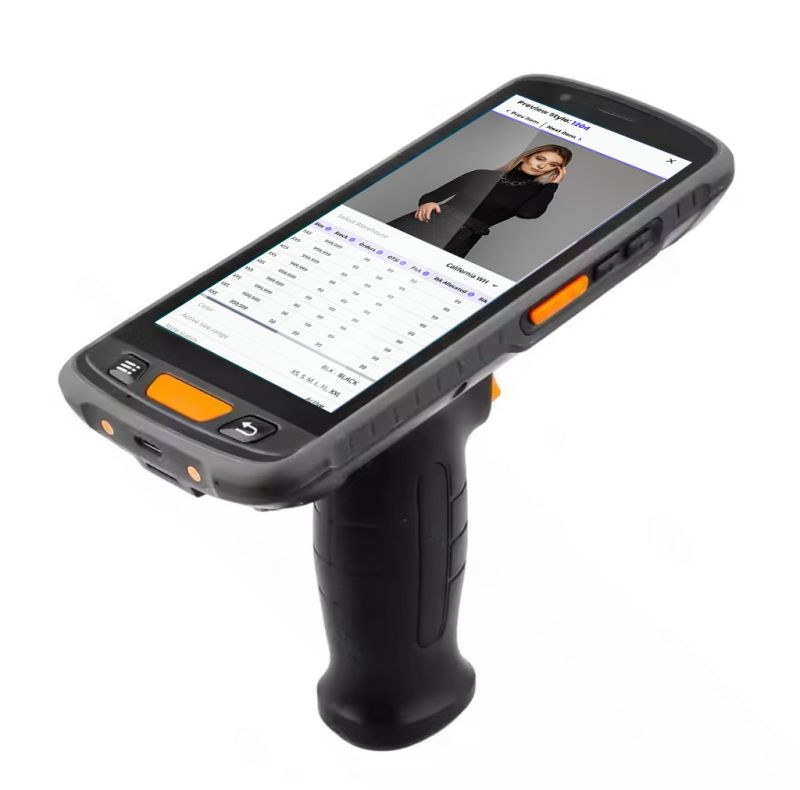
A rugged handheld running Runway. The screen in the photo is a live style: the product image and the style, color and size grid that the scan posts against, which is what a picker or counter is actually looking at.
We spec the device with you and configure the scan settings before it reaches the floor. Scan engine, battery, ruggedness and how the browser behaves on the unit all vary more than brands expect, and a handheld bought and configured without help is the one that will not read your barcodes properly on day one.
Every one of these works from a scanned UPC or from picking the style, color and size on screen.
Receive against a vendor purchase order, a cut ticket, or a garment dye, screen print or other outside processing job. That last one matters in apparel: goods leave the building to be dyed, printed or finished, and they have to come back in against the job they went out on. Scan a WIP reference barcode or a UPC.
View the pick tickets assigned to you, then scan the ticket and the items. With scan to verify switched on, the device checks the bin and the UPC as the picker works. See below.
A module built for counting rather than an adjustment with a different name. Scan, count, see the discrepancy, post with a reason code. See below.
Scan a UPC or select the style, color and size and transfer it to another bin location or another warehouse, with the movement recorded rather than remembered.
Post an inventory adjustment at the style, color and size level from the floor, so the correction happens at the shelf rather than being written on a clipboard and keyed in later.
Scan a UPC or select a style and see available quantities immediately. This is the module that gets used most and justifies the device on its own.
Pull up a production job to check the current status of goods, and edit a cut ticket, without walking back to a desk.
Check available to sell from the device, which is on hand net of what is already committed rather than a raw shelf count.
With scan to verify enabled, the picker scans the bin location, then scans the UPC of every item taken out of it. The screen shows units scanned against units expected for that pick ticket, and the system rejects anything that does not belong.
Scan a bin that is not on the pick ticket and you get an error. Scan a UPC that is not on the pick ticket and you get an error. The mistake is caught at the shelf, not at the retailer's dock.
You can require the line item UPC scan, the bin location scan, or both, and set it differently for each warehouse, so a small studio and a main distribution center do not have to run the same way.
The scan option does not appear unless the pick ticket is specifically assigned to the person holding the device, so the ticket, the picker and the scan record stay tied together.
A same bin location option keeps the bin locked while multiple UPCs come out of it, and each style, color and size is confirmed when its scanning is done.
Shows what was actually packed, by scan or by manual update, alongside a one tap control that sets a line to its required quantity and a reset that clears a line and starts it again.
The reason this matters beyond tidiness: a mispick is not one error, it is two. The customer who receives the wrong item raises a return, and the customer who was supposed to get it raises a shortage. On a retailer program it also becomes a compliance deduction, and the 856 ASN that went out claiming the right units is now wrong too. Catching it in the aisle costs a second scan.
Cycle counting is its own flow on the handheld, built for counting rather than borrowed from adjustments.
| 1. Scan and start | Scan a UPC and start the count. All sizes is the default, so the counter can scan through a full size run of that style and color without reselecting anything. |
| 2. Pick the location | Choose the location being counted from the locations in that warehouse, so the count is against a specific bin rather than the building. |
| 3. Scan the units | The screen shows the quantity the system expects in that location. Scanning any size of the style and color increases the count automatically as the counter works. |
| 4. Read the discrepancy | A discrepancy column beside each size shows where the count and the system disagree, while the counter is still standing at the shelf and can look again. |
| 5. Post it | Complete the count with a reason code, and adjust the date and time if the count was taken earlier. Confirm, and the location refreshes to the counted quantity. |
Counting a single size instead of the whole style is a single setting: turn off all sizes when the UPC is scanned and only that size stays on screen, with everything else behaving the same way.
A transfer or a count posted on the handheld is visible immediately to order management, EDI, ecommerce and accounting. Nothing waits for an overnight job.
Every scan resolves to a size, because that is how apparel stock actually exists. Systems that flatten the grid make the warehouse do the arithmetic.
GS1-128 carton labels and the 856 are built from what was scanned and packed, which is why the label and the ship notice cannot disagree.
The 846 inventory advice and every sales channel publish from the same figure the scanner just corrected.
It is the AIMS360 Runway WMS app running on a handheld barcode scanner. Warehouse staff scan the UPCs that already exist in AIMS360 to receive goods, adjust stock, transfer between bins or warehouses, look up availability, verify a pick ticket and run cycle counts. Everything posts to the same style, color and size record the rest of the ERP reads, so there is no sync and no separate warehouse database.
No. Scanning reads the UPC codes already assigned to your styles in AIMS360, at the size level. There is no second barcode scheme to generate, maintain or reconcile. If you already have UPCs on your product, the warehouse can start scanning them.
Ask us before you order. What actually matters is the scan engine, the battery, how rugged the unit is and how the browser behaves on it, and then getting the scan settings configured correctly before the device reaches the floor. Brands that buy a handheld on their own and set it up themselves are the ones who end up with a scanner that will not read their barcodes properly. AIMS360 specs the device with you and configures it.
Yes. It has a pistol grip holster with a second battery inside it, which is the difference between a picker finishing a shift and a picker hunting for a charger at 2pm. The grip also puts a hardware scan trigger under the index finger, which matters once someone is doing hundreds of scans an hour.
No. Runway runs in the device browser, so the handheld is the only thing to provision. There is no warehouse app to install per device, license separately or keep in version step with the ERP. Staff who work only in the warehouse and never touch a desktop can be given a scanner and nothing else.
Receiving, inventory adjustments, transfers between bins and warehouses, inventory inquiry, pick tickets including scan to verify, cycle counts, production job status, cut ticket edit and open to sell. Each one works from a scanned UPC or from selecting the style, color and size on screen.
It makes the picker prove what they picked. The picker scans the bin location, then scans the UPC of each item coming out of that bin, and the screen shows units scanned against units expected for that pick ticket. Scanning a bin that is not on the pick ticket returns an error, and so does scanning a UPC that is not on it. It is switched on per warehouse, and you can require the UPC scan, the bin location scan, or both.
No, and that is deliberate. The scan option only appears on a pick ticket that is specifically assigned to the person holding the device, so the ticket, the picker and the scan record stay tied together.
The counter scans a UPC and starts a cycle count, picks the location being counted, and the screen shows the quantity the system expects in that bin. Scanning any size of that style and color increases the count automatically, and a discrepancy column flags anything that does not match. The count is completed with a reason code and a date and time, then the location refreshes to the counted quantity.
Either. All sizes is the default so a counter can scan through a full size run quickly. Turning that off limits the count to the single size whose UPC was scanned, with everything else working the same way.
Vendor purchase orders, cut tickets, and garment dye, screen print and other outside processing jobs. That matters for apparel specifically, because goods routinely leave the building to be dyed, printed or finished and have to come back in against the job they went out on rather than against a factory PO. Scan a WIP reference barcode or a UPC, or select the style, color and size on screen.
Yes. The handheld writes to the same record that order management, EDI, ecommerce and accounting read, so a transfer or a count is visible to everyone the moment it posts. That is the reason the number stays true: nothing is queued for an overnight job that somebody has to check in the morning.
No, but they make it considerably more useful. With bin locations in place the scanner can direct putaway, verify the bin during picking and count a single shelf. Bin lookup accepts the first few characters of a bin ID rather than requiring the whole thing.
For most consumer brands running their own warehouse, yes, and that is the point. Receiving, putaway, picking, packing, transfers and counts run on the same platform that holds the orders and the EDI, so there is no integration between an ERP and a WMS to build, pay for or debug. Brands with highly automated facilities, conveyor sortation or robotics generally still want a specialist WMS, and AIMS360 works alongside one.
Bring us your warehouse layout and your worst count week. We will walk through receiving, scan to verify picking and rolling cycle counts on a handheld, and what it takes to get your floor onto them.


