
The style master: style numbers, seasons, divisions, a shared color library with NRF codes, ten custom attributes, images by channel, defined once for every order and channel.
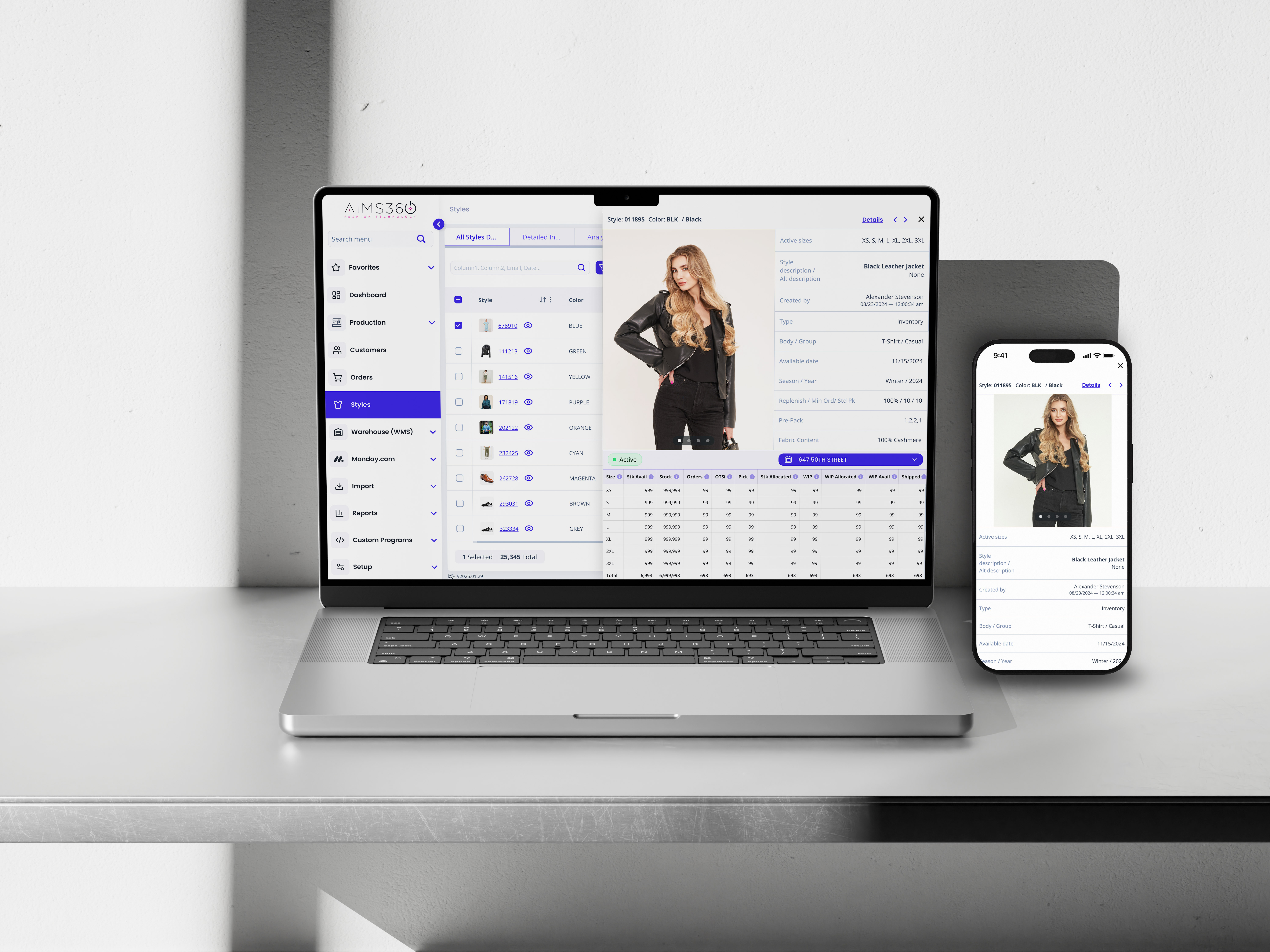
The style master is the record the rest of your company runs on: style number, season, division, size scale, colors from a shared library, prices, dates, images, costing and up to ten attributes you name yourself. Enter it once and every order, invoice, EDI catalog, webstore and B2B portal reads the same record. No second product database.
In AIMS360 a style is one record that holds everything a production ready product needs to be sold: style number, description, season, division, size scale, the colors it comes in, wholesale and suggested retail price, available and cancel dates, weight, country of origin, fabric content, images, costing and up to ten custom attributes. Colors come from a library shared across the company, so a color is defined once and reused on every style, fabric and trim that needs it.
Everything downstream reads that record. Order entry checks the season and the dates. The pick ticket reads the weight. The 832 catalog reads the UPCs, NRF codes and minimum order. Shopify and the B2B portal read the retail price and the images flagged for them. Change the record and the change travels; there is nothing to sync.
Three pages cover product information here. This one is the style record and the color library. Size matrix and dimensions is size scales, two dimensional sizing and UPC assignment. Style, color, size inventory is counting, promising and allocating stock against the definition.
Apparel data has a grain that generic product catalogs do not. Get the three levels straight and the rest of the system makes sense.
The design. One number, one description, one size scale, one season. A jacket is a style whether it comes in one color or nine.
The colorway. The jacket in navy. Its own status, dates, country of origin, images and attributes. What a buyer picks from a line sheet.
The SKU. Navy in a medium. Its own UPC, stock count and pick ticket line. What a scanner reads.
The code a brand gives one design, like 4471 or WK-2210, that stays the same across every color and size of it. In AIMS360 it is up to 15 letters and numbers, hyphens allowed, and it is the key that orders, production, stock and reporting hang on. Pick a convention, because you cannot rename a style that is in use without a new number.
One color version of a style. Three colors means three colorways, and in AIMS360 each is a style color record. Colorways are what you cancel, reprice, photograph and date individually; the style is what you cost and size.
A style in 4 colors and 6 sizes is 1 style, 4 colorways and 24 SKUs. Most systems make you manage 24 things. AIMS360 lets you manage 1 and inherit 24, then work at whichever level the task needs: cost the style, cancel the colorway, count the SKU.
Four fields are required. The rest are optional, and every one of them is read by something downstream.
| Field | What it does |
|---|---|
| Style number Required | Up to 15 letters and numbers, hyphens allowed, nothing else. It is the key every other module uses, so pick a convention before you enter the first one. |
| Description | Up to 50 characters, printed on confirmations, invoices and catalogs. Retail EDI partners usually cap it at 20 to 25, so keep the first 20 meaningful. An alternate description holds an old number or internal name. |
| Season Required | A style with a season goes only on orders for that season. A style sold across deliveries is set to Year-Round and goes on any order. That is how spring goods stop landing on fall orders. |
| Division | Womens, mens, kids, a licensed line, a second label. Divisions drive views, reports, rep assignment and what a B2B buyer sees. |
| Size scale Locks once used | Pick the scale, disable the sizes this style does not offer, and the matrix appears. Once the style is on an order, in production, costed or adjusted, the scale is final. Scales are defined on the size matrix page. |
| Colors Required | Tick the colors from the shared library, or add a new seasonal color on the spot. Each style color carries its own status, dates, country of origin, images and attributes. |
| Wholesale and suggested retail | Wholesale is the price on the order unless a price sheet overrides it. Suggested retail rides out to Shopify, the B2B portal and other channels as the retail price. |
| Year, available and cancel dates | First year on sale, first delivery and last delivery per color. Order entry warns when a delivery date falls outside the window, and the user decides. |
| Weight, origin, fabric content | Net and packaged weight feed shipping rate quotes and EDI packing. Country of origin is set per color. Fabric content is per style. |
| Standard pack and minimum order | Standard pack fills in when an ASN is auto packed without a packing rule quantity. Minimum order is enforced on marketplace orders and published in the 832 catalog. |
| Discountable, taxable, status | Whether order discounts and sales tax apply, and whether each color is active or canceled. Canceled colors drop out of order entry and catalogs. |
Once the style exists, costing says what it should cost and vendor POs buy it, and the size scale locks the moment either happens, which is why sizing is decided before the first order.
The color library is a company wide list. Styles pick from it, and so do fabrics and trims, so navy means the same thing on a shell fabric, a zipper and a finished jacket.
The code is short because it rides on every document. The description is what customers read on order confirmations and invoices, so write it for them. Retail EDI partners may cap the length; check each one.
Shade is the base color family. The NRF color code is the three digit standard retailers and vendors share, kept for decades by the National Retail Federation and moved to GS1 US in 2020. Both are optional and only matter on styles sold through retail EDI. Set once, inherited by every style.
When you create a style and the color is not in the library yet, add it from the color picker without leaving the screen. The library grows with the line rather than ahead of it.
Everything that varies by color lives on the style color: status, available and cancel dates, country of origin, color images, and any attribute set differently per colorway. NRF size codes and UPC assignment are on the size matrix page; this page stops at the color.
Every brand classifies product differently. Field customization lets you add your own dropdown attributes to the style master without a developer.
Each gets a name you choose and a list of values, each a code of 2 to 20 characters plus a 50 character description. Fit, fabric group, gender, collection, licensed property, planning class: whatever your merchandisers argue about.
An attribute can be set once for the style or differently for each colorway, so a print can carry a different collection tag than the solid. Custom fields also exist at the style, color and size level, with their own batch update.
Attributes appear as columns in list views, so you can filter every style by fit and collection, save the view for a role, and export it to Excel. Custom fields are not on the standard printed reports; the view is the report.
The same module adds custom dropdown, text and date fields to customers, orders, vendor POs, cut tickets, materials and pick tickets, so a classification can follow the style onto the order.
The default image represents the style regardless of color, in AIMS360 and in every connected channel when no color is selected.
Images per color appear when that color is selected on screen and on reports that print images, line sheets included.
Every image gets a sort order and a use: default, normal, cost or spec. Move an image to sort 1 and it becomes the default. Upload a single image and it is the default automatically.
Each image carries switches for each connected channel, so the lifestyle shot goes to Shopify and the flat lay goes to the B2B portal. A swatch flagged for a marketplace stays a swatch there.
Practical rules: file names are letters, numbers, hyphens and underscores; keep files under 4 MB because AIMS360 does not resize; load a season in bulk by naming files to the style and color; and the API can add and list images, with each image's URL shown on the style.
Pick the source, choose what comes along, colors, costing, images, and give it a new number. A carryover body in next season's colors takes a minute.
Filter to a set of styles and cancel them, apply replenishment codes, link a damaged style, push Shopify tags, set discountable or taxable, or update alternate descriptions in one pass. Reactivating is one color at a time.
Styles, opening stock and UPC codes load from a spreadsheet. Images load in bulk by file name. A PLM that exports finished styles feeds the same door, so the line comes across without rekeying.
The web app lists every style, searchable across the whole database, by color or expanded by size, with saved views, AND/OR filters and permissions by role or user. And the Claude, ChatGPT and Grok connectors read the same live data, so which fall styles have no image is a question, not a report.
The reason to keep one record is that so many things read it.
| Consumer | What it reads from the style |
|---|---|
| Order entry | Season and Year-Round rules, wholesale price, price sheet overrides, available and cancel date warnings, discountable and taxable flags, active colors and enabled sizes. |
| EDI 832 catalog | UPCs, descriptions, NRF color and size codes, minimum order, prices. Generated from the record rather than typed into a retailer portal. |
| Pick tickets, ASNs, labels | Packaged weight for rate quotes, standard pack for auto packing, color description on carton labels. |
| Shopify, JOOR, NuOrder | Suggested retail as the selling price, the images flagged for that channel, style and color tags, minimum order enforcement on wholesale marketplaces. |
| B2B portal | Images by sequence, prices, divisions and collections that decide what each buyer sees. |
| Costing and production | Bill of materials, cut tickets and vendor POs all key on the style number and its colors. |
| Reporting | Every grid, view and report pivots by style, color or size because the record is stored that way. Sell-through by style, color and size is a view, not a project. |
That list is the argument against keeping product data in a webstore or a spreadsheet. A webstore knows what it sells online. The style master knows what the company makes, buys, ships and bills, at the grain apparel actually has.
On an order, in production, costed or adjusted, and the scale is final. Decide sizing first, disable sizes you do not offer rather than inventing scales, and give a resized body a new number.
A Spring style only goes on a Spring order. If a body sells across deliveries, set it to Year-Round, or the order desk will spend a month asking why it cannot find a style.
They live in views, filters, Excel exports and the BI screens. If a formatted report must show one, build it as a saved view and export, or ask about custom report work.
Color codes, size scales, divisions and seasons must exist before the first style is entered. An afternoon of setup saves a season of cleanup.
The one record that defines a product before it is sold: style number, description, season, division, size scale, colors, prices, dates, images, costing and attributes. In AIMS360 every order, invoice, catalog, EDI document and channel reads from it, so a change made once shows up everywhere.
The code a brand assigns to one design, such as 4471 or WK-2210. It stays the same across every color and size of that design. In AIMS360 it is up to 15 letters and numbers with hyphens allowed, and it is the key that orders, production, inventory and reporting hang on.
One color version of a style. A jacket offered in black, navy and olive is one style with three colorways, each a style color in AIMS360 with its own status, images, dates, country of origin and attributes. Sizes sit under each colorway, and each size is one SKU with its own UPC.
A style is the design. A SKU is one sellable unit of it: one style in one color in one size. A style in 4 colors and 6 sizes is 1 style, 4 colorways and 24 SKUs, and AIMS360 keeps all three levels.
A code of 3 to 5 characters, a description of up to 100 characters that customers see on confirmations and invoices, an optional shade for the base color family, and an optional NRF color code. The same library names the colors of your fabrics and trims.
Three digit standard color codes that give retailers and vendors a common color language, kept for decades by the National Retail Federation and moved to GS1 US in 2020. You need them only on styles sold through retail EDI, where the UPC catalog carries them. Set them on the color once and every style using it inherits them.
Yes. Field customization gives the style master up to ten dropdown attributes you name yourself, each value a code and description. Attributes can be set per color, and there are custom fields at the style, color and size level as well. They show in list views and filters and export to Excel.
In the style master, in list views, filters and the Excel exports from those views, and in the BI screens. They are not on the standard printed reports, so if a report needs one, build it as a view and export.
A style default image represents the design in every channel; color images represent each colorway. Each image has a sort order, with sort 1 as the default, a use such as default, normal, cost or spec, and channel switches so a B2C store and a B2B portal can show different photos. Keep files under 4 MB; AIMS360 does not resize.
Yes. Duplicate a style to a new number and choose what carries over: colors, costing, images and the rest. It is the fastest way to set up a carryover body in next season's colors.
Yes. Global changes cancels styles and colors in bulk and applies replenishment codes, damaged style links, Shopify tags, discount and tax settings and alternate descriptions across any filtered set. Custom fields have their own batch update. Reactivating is one color at a time.
Yes. Styles, opening stock and UPC codes can be loaded from a spreadsheet during setup or for a new season, and images can be loaded in bulk by file name. A PLM that exports styles can feed the same import.
Yes. The web app has a styles list that searches every style in the database, shows all styles by color or by size, and saves views with your columns, AND/OR filters and permissions by role or user. Open any row for the style detail.
Yes, on purpose. A style tagged Spring can only be placed on a Spring order. If the same body sells across deliveries, set it to Year-Round and it goes on any order.
Only until the style is used. Once it is on a customer order, in work in process, costed or in a stock adjustment, the scale is final. Disable unused sizes instead of creating scales, and if the sizing really changes, set up a new style number.
Yes, at the solution level. AIMS360 production and PLM covers draft styles and samples, bills of materials, costing, spec sheets generated from the style record and production, and tech packs are stored against the style. Color approvals, fit sessions and design work run in a connected PLM such as Centric PLM, WFX or BeProduct, and the approved style flows into the style master. Many brands run both.
The 832 UPC catalog is generated from the style master: UPCs, descriptions, NRF color and size codes, minimum order and prices. Shopify, the B2B portal and wholesale marketplaces receive the style with the images and prices flagged for that channel, so nobody rekeys products.
Three pages, three jobs. This one is the style record and the color library. The size matrix page is size scales, two dimensional sizing and UPC assignment. The style, color, size inventory page is counting, promising and allocating stock against that definition.
Yes. The Claude, ChatGPT and Grok connectors answer over live AIMS360 data, so asking which fall styles have no image, or which colors were canceled this month, returns a table from the style master rather than an exported report.
We will set up two of your styles, colors and all, while you watch, and then show you where each field turns up: the order, the catalog, the webstore, the label.


