AIMS360 Shopify ERP integration: products with images and variants, real-time inventory by warehouse, orders, shipping confirmations, cancels and returns, on one stock record with wholesale and EDI.

Enter a style once in AIMS360 and it reaches Shopify with images and variants already built. Inventory syncs in real time by warehouse, orders import and pick automatically, ship from your own warehouse or a 3PL, the confirmation goes back, and cancels and returns come home to the same record. Wholesale, EDI and marketplace commitments come out of that record before Shopify ever sees a number.
The AIMS360 Shopify integration connects the AIMS360 apparel and consumer brands ERP to Shopify, Shopify Plus, Shopify POS and Shopify B2B. It is built and maintained by AIMS360, free to install from the Shopify App Store, and it syncs six things: product information including images and variant creation; real-time inventory with customizable inventory templates across multiple warehouses and Shopify locations; orders; shipping confirmations and tracking; cancels and quantity changes; and sales from every channel into one AIMS360 order book. Because AIMS360 also holds your wholesale, EDI and marketplace commitments, the number Shopify shows is the number you can actually sell.
The flow is simple to say and hard to fake. Once your product team approves a style, it is entered in AIMS360 once and sent to every sales channel, Shopify included. You refine the listing in Shopify and put it live when you are ready, or take pre-orders before the goods land. When inventory is received, Shopify updates in real time and the orders waiting on that stock are picked. Each order routes to the right warehouse, yours on the AIMS360 warehouse management system or your 3PL. The shipping confirmation closes the order in Shopify. Returns come back through your returns app, and AIMS360 separates good stock from damaged and drives the refund.
Apparel makes this harder than most categories. A single style can carry forty or more sellable variants once you multiply colors by sizes. Systems that treat a variant as a flat SKU force your team to rebuild that matrix by hand everywhere it appears. AIMS360 holds style, color and size as structured data and hands Shopify the variants already built.
AIMS360 is the master record for product, stock and the order. Shopify is the storefront. Each item below has one owner and one direction, which is what keeps the two systems from fighting each other.
Title, description, retail price, SKU, UPC, tags, product type and vendor come from the AIMS360 style. Images marked for Shopify are sent at style and color level, and the default color image becomes the variant image. The color and size options are created as Shopify variants, so nobody rebuilds the size run by hand. Push again later to update selected fields.
Every event that changes open to sell, an order from any channel, a receipt, an adjustment, a transfer, a count, an invoice, pushes a fresh number to the matching Shopify location within moments. A customizable inventory template per location decides what counts as sellable: which warehouses, incoming production to a date, a safety buffer, a percentage, allocated stock and pending orders.
Paid, unfulfilled Shopify orders import automatically, live as they happen, with the shopper's ship to and bill to, the Shopify order number, the discount and the location on each line. They land in the same order screen as wholesale, EDI and marketplace orders, and the AIMS360 order number is written back on the Shopify order.
When the shipment is invoiced in AIMS360, the order is marked fulfilled in Shopify with the carrier and tracking number, Shopify sends the shopper the shipping email, and the order is closed out. It works the same whether the box left your warehouse or a 3PL.
Cancel an order, or the unshipped balance of one, in AIMS360 and choose what happens in Shopify: cancel and refund the shopper through Shopify up to the amount captured, cancel without a refund, or cancel in AIMS360 only. The pre-payment is released, the note lands on the Shopify order, and the shopper can be notified.
Shopify web, Shopify POS, Shopify B2B, the marketplaces you run through Shopify, wholesale, B2B platforms and retailer EDI all post to one AIMS360 order book with the source on each order. Map each channel to its own customer account and sales report by channel without exporting anything.
A return approved in Loop, ReturnGO or Shopify POS creates the RMA in AIMS360. Receive it as good or damaged, issue the credit, and the refund and the restocked availability both flow back. Returns integrations.
Warehouse, retail store and 3PL each publish their own availability to the matching Shopify location, each on its own template. Multi-warehouse is the switch that turns it on.
One order's life, in the order it actually happens. Every step below is something the connection does today, and where a step has a rule or a limit, it is written next to it rather than left for the demo.
The approved style is created in AIMS360 with its colors, sizes, SKUs, UPCs, retail price, description, fabric content, country of origin and images. From there it goes to Shopify and to every other channel you sell on: wholesale, B2B platforms, marketplaces and retailer EDI. For Shopify, the color and size options are created as variants, images marked for Shopify are sent at style and color level, and the default color image becomes the variant image. Products already live in Shopify are mapped to the AIMS360 style instead of recreated, so listings, reviews and URLs survive.
Rules worth knowing. You choose once, per store, whether a style becomes one Shopify product with color and size options or one product per color. Shopify caps a product at 100 variants; past that AIMS360 splits the style into a second product automatically.
AIMS360 sends the product unpublished by default so your ecommerce team can finish the listing in Shopify: rich descriptions, collections, SEO fields, extra imagery, then publish in a batch when the launch is ready. Title, description, price, SKU and vendor are safe to edit in Shopify. The variant structure, the handle and the color and size options belong to AIMS360, because that is what the orders and the inventory sync key on.
Need to take orders before the goods arrive? AIMS360 handles pre-orders: either the style is set to sell with no stock on hand, or the inventory template counts incoming production due within a window you choose.
AIMS360 does not send raw stock to Shopify. It sends open to sell, calculated by a customizable inventory template for each Shopify location: which warehouses count, whether incoming production counts and how far out, a protected buffer, a percentage of the position, allocated stock, pending orders from other channels. Any event that changes that number, an order from any channel, a receipt, an adjustment, a transfer, a cycle count, an invoice, triggers a push, and Shopify updates within moments. Stock committed to wholesale or a retailer purchase order never shows on the website unless you decide it should.
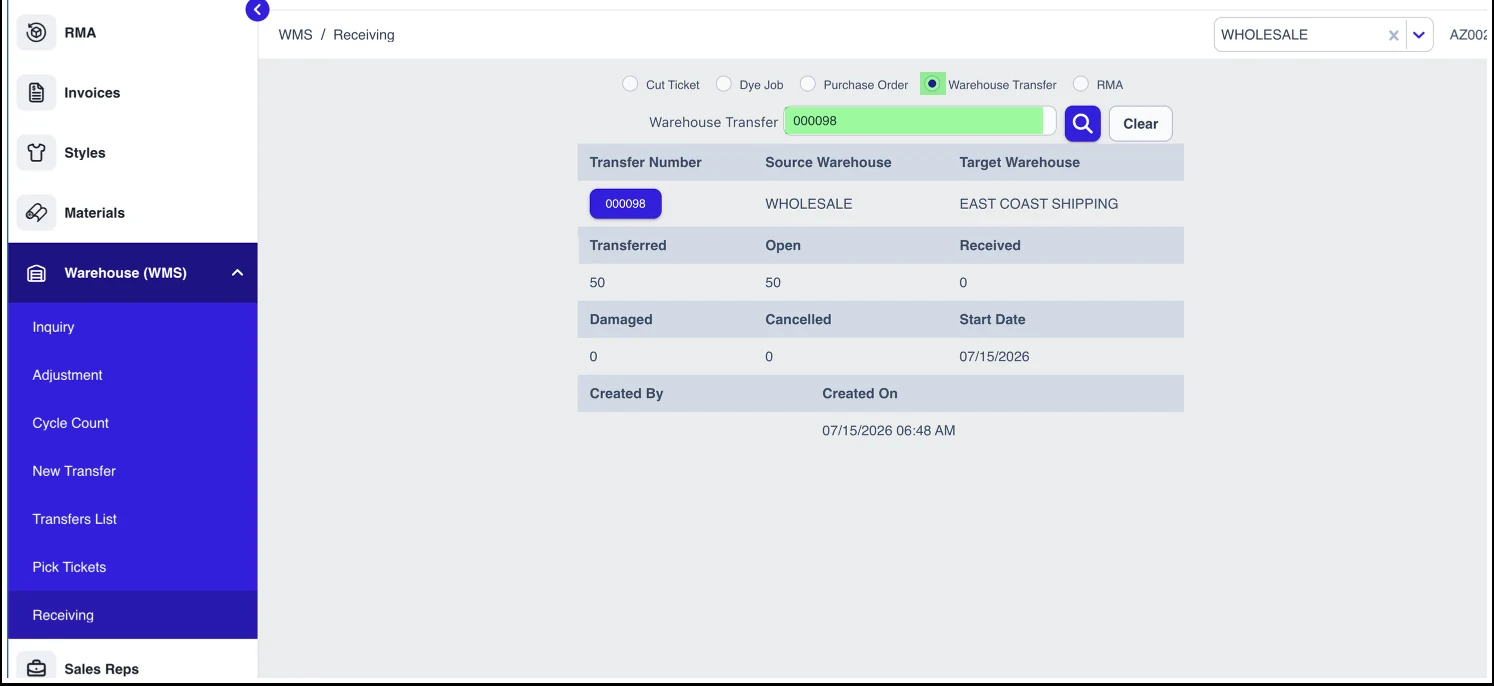
Receiving a purchase order, a cut ticket or a transfer on the handheld or at the desk is one of the events that pushes a new number to Shopify. Paid, unfulfilled Shopify orders have been importing as they happen, and the order automation creates a pick ticket for each one it can fill. Orders that were waiting on the goods that just landed are picked next: the automation re-runs the orders it could not fill, and intelligent allocation assigns the received units to waiting orders by your rules, oldest completion date first if that is the rule, down to the size, without over-allocating.
Limit. Shopify does not split one order line across two locations. A line short at its location fails the pick until stock is transferred, so most brands feed each Shopify location from one warehouse or use a virtual warehouse for online stock.
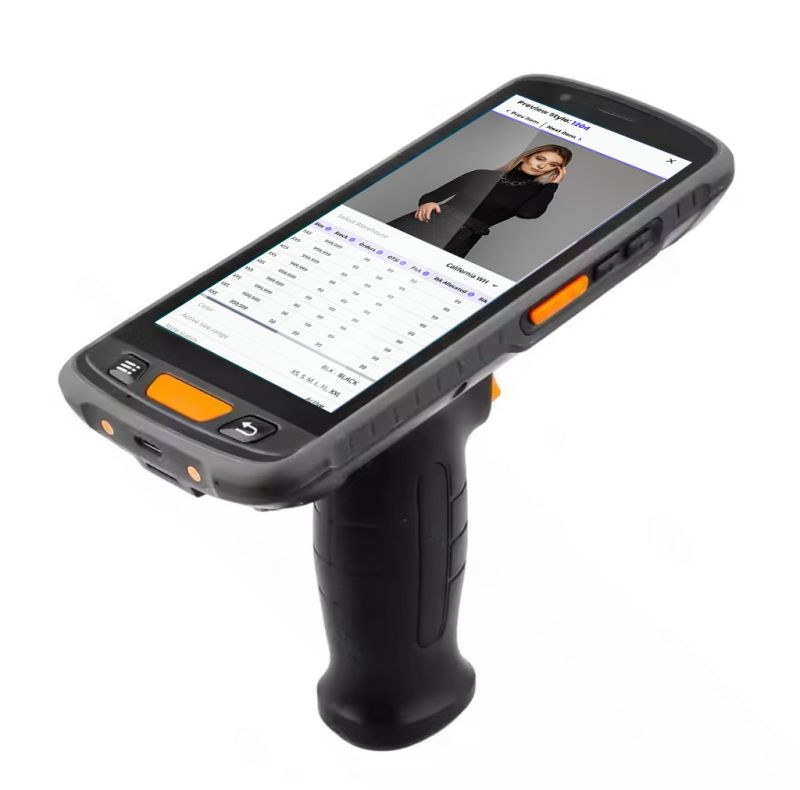
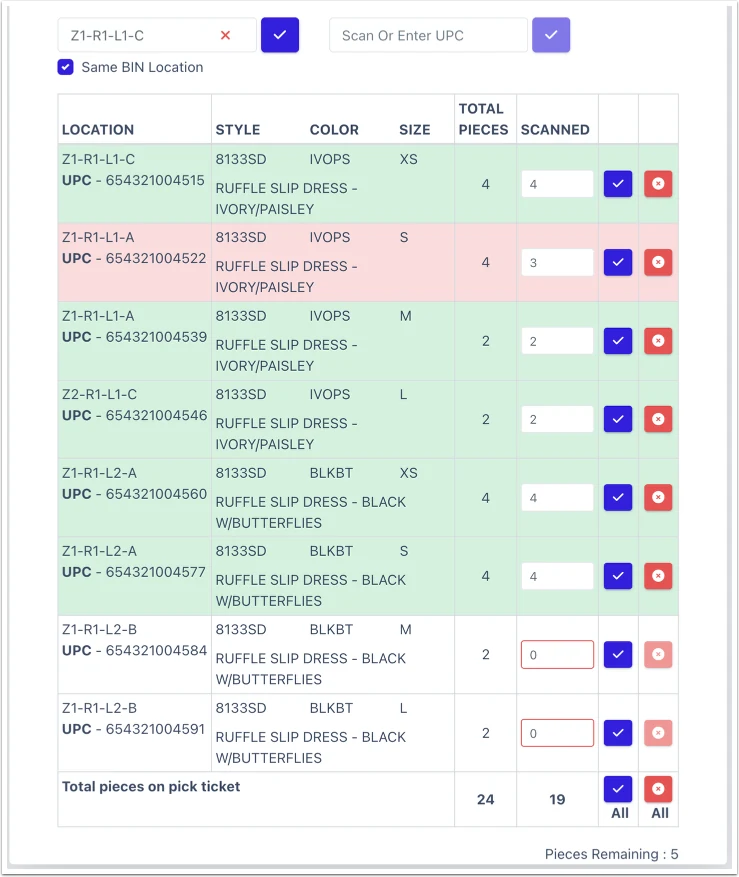
Each order, and each line, carries the Shopify location that will fill it, or the preferred warehouse on the channel's customer account. If that is your own building, the pick ticket appears on a rugged handheld running AIMS360 Runway. The picker scans the bin, then the UPC of every unit leaving it, and the screen shows scanned against expected. Scanning a bin or a UPC that is not on the ticket errors on the spot. Cycle counts, transfers and receiving run on the same device. If the location is a 3PL, the order goes out as a warehouse shipping order over the 3PL connection and comes back as a shipment confirmation; brands that ship themselves can also run the ShipStation connection.
More on the warehouse side: mobile device scanning, pick tickets, bin locations and the DTC and 3PL fulfillment automation page.
When the shipment is confirmed and invoiced in AIMS360, the Shopify order is marked fulfilled with the carrier and tracking number, Shopify emails the shopper, and the order closes. Revenue, cost and margin are already on the AIMS360 invoice, so the sale reports beside your wholesale and EDI business without a spreadsheet.
Where the automation ends today. Brands using a 3PL connection or ShipStation get the full unattended flow: import, pick, ship, invoice, confirm. Brands printing their own labels through the AIMS360 shipping API get automatic import, pick ticket creation and inventory sync, and confirm the shipment as a step in AIMS360.
Cancel the whole order, or the balance a shopper no longer wants after a partial shipment, in AIMS360 and choose the outcome: cancel in both systems and refund the shopper through Shopify up to the amount captured, cancel in both without a refund, or cancel in AIMS360 only. The pre-payment on the order is released and adjusted, a note is added to the Shopify order, and the shopper can be notified from the same prompt.
Direction matters. Once an order has imported, edits made inside Shopify do not flow back to AIMS360. Make the change in AIMS360 and let it sync out.
A return approved in Loop, ReturnGO or at a Shopify POS register creates the return authorization in AIMS360, with the RMA number written back on the Shopify order. When the parcel arrives, each unit is received as good stock or damaged: good units go back to the warehouse and the new availability pushes to Shopify, damaged units stay out of the sellable count in a damage bin or warehouse. The credit memo in AIMS360 drives the refund. With Loop, the refund goes to the shopper's original payment method through the connection; with other apps the refund is issued in the app and the credit keeps receivables clean. Less return loss, because damaged goods never go back on sale and the money side is reconciled in one place.
Returns integrations and the returns management (RMA) page cover exchanges, store credit and the accounting.
Yes. AIMS360 handles Shopify pre-orders two ways. A style can be pushed as sellable with no stock on hand, so Shopify takes the order and AIMS360 holds it until the goods are received. Or the inventory template for that location can count incoming production due within a window you set, so the storefront sells against units that are in work and stops when the window is used up. Either way the order lands in AIMS360 like any other, and the received units are allocated to the waiting pre-orders by your rules.
The style is exported as unlimited inventory, tagged for pre-order and given a shipping window in its product note. Because Shopify has no completion date, the orders import dated today; your team sets the expected date in AIMS360 so allocation and reporting know it is a pre-order.
An open to sell template that includes work in process due within, say, 45 days publishes those units to Shopify. Pad the order completion date a few days and intelligent allocation can give a Shopify order the production that lands next week rather than failing the pick today. WIP and transfer tracking is where the dates come from.
A Shopify integration only earns trust when it holds up on the worst day of the year, not the average one. AIMS360 has been building apparel software for 40+ years and has run in the Shopify App Store since January 2016, and the integration is engineered for peak-season load where a single dropped update means an oversell, a canceled order, or a chargeback.
That scale is why the sync is real time rather than batched and why availability recalculates on every allocation, receipt, return, and shipment. When one store can move more than a million orders in a day, the number in the storefront cannot lag behind the warehouse.
Shopify inventory management is the process of tracking how many units of each product variant you have available to sell and keeping that number accurate as orders come in and stock arrives. Shopify tracks quantities for the products in its own store. Once a brand also sells wholesale, through retail doors, on marketplaces, or through EDI purchase orders, the accurate number has to be calculated outside Shopify and pushed in, because Shopify cannot see the commitments made in those other channels.
That is the job AIMS360 does. It holds the master stock record for the whole business, subtracts what every channel has already committed, and publishes the remainder to each Shopify location in real time. Your storefront stops being a place where inventory is guessed at and becomes a display surface for a number that is already correct.
The number Shopify sees is not a fixed formula. AIMS360 inventory templates are customizable rulesets that decide exactly which stock counts as sellable for a given channel, so the storefront can draw on as much or as little of your position as you want. The template can also count incoming production due within a window, and intelligent allocation can reserve incoming production up to a chosen date, so a pre-book or a capsule launch can sell against units that have not landed yet.
Common variables brands build into a template:
A retailer places a purchase order for 600 units for a September delivery. The same units are sitting in your warehouse today. If your storefront can see them, your best selling size sells out online and the retailer order ships short. Chargebacks follow, and the retailer remembers.
Nothing inside Shopify prevents this, because Shopify has no visibility into a purchase order that arrived over EDI. The same gap opens between your website and a rep order, a marketplace listing, or units already picked at a 3PL. Every channel is confident it can sell the unit because no channel can see the others.
AIMS360 closes it with virtual warehouses. Stock committed to wholesale and EDI is held in its own logical bucket, and only the direct to consumer portion is published to Shopify. Change the allocation rule and the number Shopify sees changes with it. If you would rather run a single sellable pool, you can do that too. The point is that it becomes a decision you make, not a side effect of how the app happens to work.
One number across every channel. Simple, and correct for brands whose wholesale commitments ship from separate production runs.
Wholesale and EDI stock ring fenced, direct to consumer sees the remainder. Correct for brands shipping both channels out of one warehouse.
Growth adds places where stock physically sits and places where it is sold. Those are two different problems and AIMS360 handles them separately.
A warehouse, two retail doors, and a 3PL facility each map to their own AIMS360 warehouse and their own Shopify location. Shopify routes each order to the location that can fill it. Transfers between locations update both systems, so a unit moved to a store stops being sellable from the warehouse.
A main storefront, an outlet store, a B2B storefront, and regional storefronts all connect to the same AIMS360 record. You decide per store whether it shares the main pool or draws from a warehouse of its own. All of them are managed from one screen.
This is where a plain sync app runs out of room. Most connect one store to one system and maintain their own idea of what is available. Add a second store and you have two apps disagreeing, with no arbiter. AIMS360 is the arbiter.
If you run Shopify POS, the register is just another channel drawing on the same pool. A sale at the counter reduces availability everywhere within seconds rather than at the next stock count, and a unit reserved for an online order is not sitting on the shop floor waiting to be sold twice.
Barcodes carry through the whole chain. The same code you print for a retailer carton scans at your own register, which means one product identity across wholesale, ecommerce, and retail instead of three systems that each invented their own.
Each retail door maps to an AIMS360 warehouse with its own on-hand count and its own published availability.
Mobile barcode scanning for counts, picking, and shipping, so corrections land in the master record rather than a spreadsheet.
Moving stock from warehouse to store adjusts both Shopify locations and leaves an audit trail in AIMS360.
Shopify is one door. Consumer brands on AIMS360 usually run several, and the point of an ERP behind Shopify is that they all post to one record: one order screen, one stock number, one set of sales reports.
Shopify web, Shopify POS registers, Shopify B2B company orders, and the marketplaces you run through Shopify's marketplace app, including Amazon FBM, Target Plus, Walmart Marketplace and eBay. Tags map each channel to its own AIMS360 customer account while the source stays Shopify.
Rep and showroom orders, wholesale portal orders, JOOR, NuORDER and Brandboom, EDI purchase orders from 350+ retailers, dropship programs, and Amazon FBA on its own connection. Each arrives on the same order screen with its source shown.
Because every channel is a customer account or a source in AIMS360, sales, margin and sell-through report by channel, by style, color and size, and by warehouse. Nothing is exported from Shopify and stitched together later.
Setup detail that matters: channel-level reporting comes from mapping each channel to its own customer account (a POS store per account, a marketplace per account). Without that mapping, Shopify orders report as Shopify. The omnichannel order management page covers the order screen and the DTC and retail integrations hub lists every consumer channel that connects.
Five steps, configured with your AIMS360 implementation manager, the same person who demonstrated the system. The technical connection is quick; data preparation sets the timeline.
Add AIMS 360 Fashion Business ERP from the Shopify App Store and authorize it on the store you want to connect. Repeat for each store if you run more than one.
Decide which AIMS360 warehouses feed which Shopify locations, including retail stores on Shopify POS, and whether wholesale and direct to consumer stock share a pool or stay separate. This is the decision that shapes everything downstream, so it comes early.
Push styles from AIMS360 with colors, sizes, SKUs, barcodes, descriptions, and images. Products already live in Shopify can be mapped to existing AIMS360 styles instead of being recreated, so you do not lose your listings, reviews, or URLs.
Set the rules so availability updates to Shopify in real time and Shopify orders import into AIMS360 automatically. After this nobody touches a quantity field in Shopify by hand again.
Pick, pack, and ship in AIMS360, or route the order to your 3PL. Fulfillment status and tracking numbers post back to Shopify so the shopper gets their notification automatically.
The AIMS360 integration works on every Shopify plan, Basic through Shopify Plus, and with Shopify POS on any of them. What changes with Plus is scale rather than the connection: expansion and international storefronts on one AIMS360 pool, Shopify B2B for wholesale on the storefront (a Plus feature), and higher order throughput for peak drops.
| Capability | Shopify Basic, Shopify, Advanced | Shopify Plus |
|---|---|---|
| Product, image and variant push | Included | Included |
| Real-time inventory sync on templates | Included | Included |
| Automatic order import (paid and unfulfilled) | Included | Included |
| Shipping confirmation and tracking write-back | Included | Included |
| Cancels with refund through Shopify | Included | Included |
| Multi-location stock control | Included | Included |
| Shopify POS sync | Included | Included |
| Shopify B2B company orders | Shopify B2B is a Plus feature | Included |
| Multiple connected stores | Supported | Common: outlet, B2B and regional storefronts on one pool |
| Expansion and international storefronts | Not on these plans | Each storefront maps to AIMS360 warehouses |
| Higher order throughput | Standard | Built for peak drops and flash volume |
On the AIMS360 side, the live automation, unattended order import, pick ticket creation and inventory sync, is part of the plans built for direct to consumer volume. Which plan you need depends on your channels; see AIMS360 pricing.
There are three ways to keep Shopify inventory accurate. They fail at different points, and the failure point is usually the first wholesale account or the first retailer purchase order.
| Inventory sync app | General ERP plus connector | AIMS360 | |
|---|---|---|---|
| Real-time stock sync to Shopify | Yes | Often batched | Yes |
| Style, color, size as structured data | Flat SKUs | Usually paid customization | Native |
| Wholesale and DTC on one stock ledger | No | Varies | Yes, with virtual warehouses |
| Multiple Shopify stores on one pool | Limited | Varies | Yes, from one screen |
| EDI purchase orders from retailers | No | Third party VAN or middleware | Built in, 350+ retailers |
| Raw materials and production | No | Paid module | Included |
| Middleware layer required | Sometimes | Usually | None |
| Per transaction or per document fees | Common | Common | No |
| Who you call when it breaks | App vendor | ERP, connector vendor, or partner | Your AIMS360 implementation manager |
Put plainly: if you sell one channel and you are under a few hundred orders a month, a sync app is fine and cheaper. The moment you add wholesale, EDI, a 3PL, retail doors, or a second storefront, the number of places inventory has to agree grows faster than the tooling around it. That is the point where brands move to AIMS360.
Accurate stock is the visible benefit. It works because AIMS360 is a full consumer brands ERP rather than a connector, so the events that change availability are all happening inside one system instead of being reported into it after the fact.
The same stock logic runs across every category AIMS360 supports: fashion and apparel, footwear, jewelry, bags and accessories, cosmetics, beauty and personal care, outdoor and sporting goods, wellness and supplements, home, furniture and lifestyle, household and home care, baby and children's, and pet products. If the brand carries physical product with variants, wholesale doors, and a Shopify storefront, the operating model is the same.
Rep orders, line sheets, and B2B platforms including JOOR, NuORDER, and Brandboom allocate stock the moment they land.
Purchase orders from 350+ retailers arrive through built-in EDI and reserve units before your storefront can sell them.
Amazon Seller Central, Vendor Central, and dropship programs run against the same stock ledger.
Cut tickets, work in progress, and incoming deliveries so future stock is visible before it lands, not after.
Bins, barcodes, and picking in AIMS360 WMS, or hand it to a 3PL such as Extensiv.
Invoicing, accounting, factoring, and landed cost, so you see margin by channel, order, and SKU.
Every review below is published publicly on the AIMS360 listing in the Shopify App Store.
Reports real-time sync of inventory, orders, and customer data between Shopify and AIMS360, and credits the integration with letting the team scale ecommerce operations at high omnichannel order volume.
Describes mapping styles, colors, and sizes into Shopify, keeping inventory in bin locations through warehouse management, and using mobile scanners for cycle counts, picking, and shipping.
A golf and lifestyle brand running Shopify alongside wholesale, using AIMS360 as the single stock record across styles, orders, and fulfillment.
More brand stories are on the AIMS360 reviews and stories page.
Shopify is one connection. These are the pieces most brands turn on alongside it.
Yes. AIMS360 has a native Shopify integration, built and maintained by AIMS360 and free to install from the Shopify App Store, where it has been listed since January 2016. It works with Shopify, Shopify Plus, Shopify POS and Shopify B2B, and AIMS360 is listed in the Shopify Partner Directory. There is no middleware and no per order fee; Shopify connectivity is part of the AIMS360 subscription.
Six things: product information including images and variant creation; real-time inventory with customizable inventory templates across multiple warehouses and Shopify locations; orders; shipping confirmations and tracking; cancels and quantity changes; and sales from every channel into one AIMS360 order book. Returns connect through your returns app, and each Shopify location publishes its own availability.
Yes. Once a style is approved and entered in AIMS360, the export creates the Shopify product with its color and size options as variants, and sends the title, description, retail price, SKU, UPC per size, tags, product type, vendor and the images marked for Shopify at style and color level. The default color image becomes the variant image. Products already in Shopify can be mapped to an AIMS360 style instead of recreated, and a later push updates only the fields you select.
Yes, within limits. Title, description, price, SKU and vendor are safe to edit in Shopify, and most brands finish collections, SEO fields and extra imagery there before publishing. The variant structure, the handle and the color and size options belong to AIMS360, because the order import and the inventory sync key on them. AIMS360 sends the product unpublished by default so you go live when you are ready.
AIMS360 holds the master inventory record and sends Shopify open to sell rather than raw stock. Every event that changes it, an order from any channel, a receipt, an adjustment, a transfer, a cycle count, a return or an invoice, recalculates the number and pushes it to the mapped Shopify location within moments. Shopify orders flow the other way and reduce availability the moment they import.
Yes. Each Shopify location has a customizable inventory template that decides what counts as sellable: which warehouses, whether incoming production counts and how many days out, a protected minimum, a percentage of the position, allocated stock, pending orders from other channels and units on pick tickets. That is how a brand exposes only the direct to consumer share while wholesale and EDI commitments stay protected, or sells a pre-book against production that has not landed.
Yes, two ways. A style can be exported as sellable with no stock on hand, tagged for pre-order with a shipping window in its note, and AIMS360 holds the orders until the goods are received. Or the inventory template can count work in process due within a window you choose, so Shopify sells against production and stops when the window is used up. Received units are then allocated to the waiting orders by your rules.
Automatically. Paid, unfulfilled orders import live as they happen, with the shopper's ship to and bill to, the Shopify order number, the discount as an order-level amount and the location on each line. Orders that are unpaid, or fulfilled inside Shopify, do not import, which is why checkout is set never to auto-fulfill. The AIMS360 order number is written back on the Shopify order. The direct to consumer order page covers the record and the money in detail.
Two things. The receipt pushes a new availability number to Shopify within moments, and the orders that were waiting on that stock are picked: the order automation re-runs the ones it could not fill, and intelligent allocation assigns the received units to waiting orders by your rules, down to the size, without over-allocating. Pick tickets then appear on the handheld or go to the 3PL.
Yes. AIMS360 includes a warehouse management system with bin locations, and AIMS360 Runway runs on a rugged handheld in the device browser. Shopify pick tickets are picked with scan to verify: scan the bin, scan the UPC of each unit, and the screen shows scanned against expected, so a short or wrong unit is caught before the box closes. Receiving, transfers and cycle counts run on the same device, and AIMS360 specs and configures the handheld with you.
Yes. If a Shopify location maps to a connected 3PL, the order goes out as a warehouse shipping order and comes back as a shipment confirmation, which invoices the order in AIMS360 and marks it fulfilled in Shopify with tracking. Brands that ship themselves can run the ShipStation connection for the same unattended flow.
Yes. When the shipment is invoiced in AIMS360, the Shopify order is marked fulfilled with the carrier and tracking number, Shopify emails the shopper, and the order is closed out. It works the same whether the box left your warehouse or a 3PL.
In AIMS360, then synced to Shopify. Cancel the whole order, or the unshipped balance after a partial shipment, and choose to cancel in both systems and refund through Shopify up to the amount captured, cancel in both without a refund, or cancel in AIMS360 only. The pre-payment is released, a note lands on the Shopify order and the shopper can be notified. Edits made inside Shopify after an order has imported do not flow back, so make changes in AIMS360.
Yes. A return approved in Loop, ReturnGO or at a Shopify POS register creates the RMA in AIMS360. Each unit is received as good or damaged: good stock goes back to the warehouse and the new availability pushes to Shopify, damaged stock stays out of the sellable count. The credit memo drives the refund, back to the original payment method through Loop, or issued in the app for the others, and receivables stay reconciled.
Yes. Shopify web, Shopify POS, Shopify B2B, marketplaces run through Shopify, wholesale, B2B platforms and retailer EDI all post to one AIMS360 order screen with the source on each order. Map each channel to its own customer account and sales, margin and sell-through report by channel without exporting anything. See omnichannel order management.
Yes. Each Shopify location maps to an AIMS360 warehouse with its own template, so a warehouse, a retail store and a 3PL can each publish their own availability. AIMS360 also connects to several Shopify stores at once, a main storefront plus an outlet, a wholesale storefront or regional stores, all managed from one screen and sharing one pool or drawing from separate warehouses. Multi-warehouse is the switch.
Yes. Each Shopify POS location maps to its own AIMS360 warehouse, a sale at the register draws from the same record as the online store, wholesale and EDI, and the same barcode scans at the register, in the warehouse and on a retailer carton. Register returns and exchanges can create the RMA automatically.
Yes. Shopify B2B company orders import into AIMS360 the same way, against their own customer accounts, so wholesale orders placed on Shopify draw from the same stock record as your rep, portal, B2B platform and EDI orders.
Any Shopify plan. The integration works on Basic, Shopify, Advanced and Shopify Plus, and with Shopify POS on any of them. What Plus adds is scale: expansion and international storefronts on one AIMS360 pool, Shopify B2B for wholesale on the storefront, which is a Plus feature, and higher order throughput for peak drops.
Yes to both. The app is AIMS 360 Fashion Business ERP on the Shopify App Store, free to install and listed since January 19, 2016, and AIMS360 is listed in the Shopify Partner Directory for systems integration, product and collection setup, wholesale and B2B, and POS setup.
No middleware. The integration is built and maintained by AIMS360 and talks to Shopify directly, so there is no integration platform to license, no per transaction or per document fee and no third party support queue. The app is free to install and Shopify connectivity is part of your AIMS360 subscription; see AIMS360 pricing.
The technical connection is quick: install the app, authorize the store, map warehouses to locations. What sets the timeline is data preparation, cleaning up styles, deciding the warehouse and template rules, and matching existing Shopify products to AIMS360 styles. Most brands go live within a few weeks as part of a wider AIMS360 implementation, run by the same implementation manager who demonstrated the system.
Shopify is the native cart connection, with the app, the real-time sync and the automation described on this page. Other carts connect through the AIMS360 open API, a connector partner or the order import, scoped per program during implementation, so ask about your platform before you plan around it.
For apparel the deciding factors are whether the system treats style, color and size as structured data rather than flat SKUs, whether it can hold wholesale and EDI commitments against the same stock the storefront sells, and whether it runs the warehouse. AIMS360 was built for apparel and consumer brands and does all three, with a native Shopify connection. The best ERP for Shopify guide compares the options.
It is the process of tracking how many units of each product variant you have available to sell and keeping that number accurate as orders come in and stock arrives. Shopify tracks quantities for the products in its own store. Once a brand also sells wholesale, through retail doors, on marketplaces or through EDI purchase orders, the accurate number has to be calculated outside Shopify and pushed in, because Shopify cannot see the commitments made in those other channels.
Bring a style with a real color and size matrix and we will push it to a Shopify store on the call, then show what happens to the stock number when a wholesale order lands. Thirty minutes, no slide deck.


